Using Voice Tags in Narrafix
Voice Tags automatically detect and label voices in multi-narrator projects. They also group markers by narrator, making it easier to create and share separate pickup packages for each voice.
This is especially useful for projects that have already been assembled before they are uploaded for proofing, such as duet productions, multi-narrator audiobooks, or full multi-cast recordings. Voice Tags help identify the different voices within the assembled audio and assign proofing markers to the relevant narrator.
This feature is currently rolled out through our user base gradually and may not be accessible yet in your account. Please write us an email to support@narrafix.audio if you are interested in using it right away.
Activate the Voice Tags module
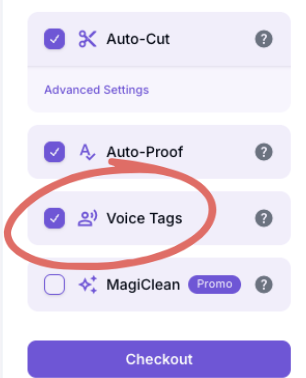
To use this feature, activate the Voice Tags module during checkout.
Once the project has been processed, the automatically generated voice tags will appear on the relevant markers in Narrafix Studio.
Review and edit voice tags
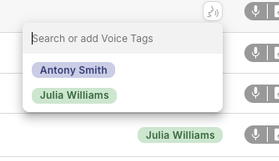
Voice tags are assigned automatically, but you can review and adjust them at any time.
Hover over a voice tag to:
- Change the tag name
- Reassign the marker to another voice tag
- Manually correct an automatically assigned tag
This allows you to correct assignments, use the narrators’ actual names, and adapt the voice tags to your project and workflow.
Share pickup links by voice tag
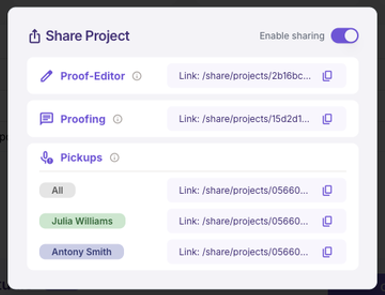
When your markers are ready, click Share.
You can then access:
- An individual pickup link for each narrator or voice tag
- One combined pickup link containing all markers in the project
Each individual pickup link contains only the markers assigned to the corresponding voice tag. This allows every narrator to receive a focused pickup package containing only their own corrections, even when the original audio was uploaded as one fully assembled multi-narrator production.